
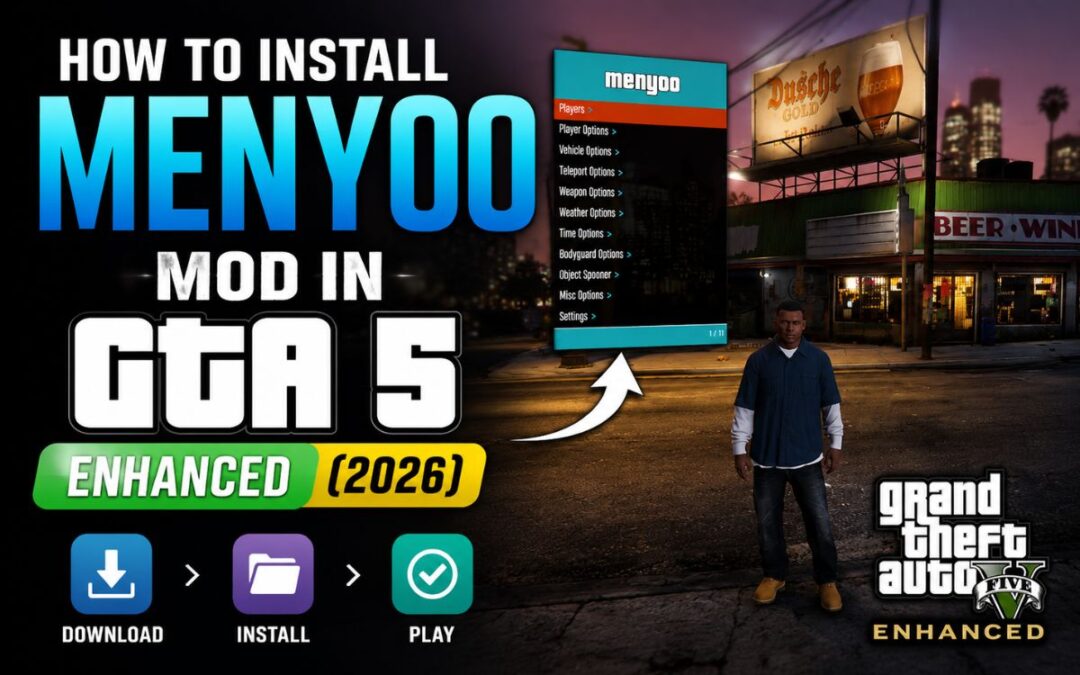
How to Install Menyoo Mod in GTA 5 Enhanced (2026)
You want to know How to Install Menyoo Mod in GTA 5 Enhanced.
But the moment you search how to do it — suddenly there’s ScriptHookV, ScriptHookVDotNet, OpenRPF, ASI files… and it all feels way more complicated than it should be.
Don’t worry. I’ll make this simple.
This guide covers everything — which files to download, where to put them, and how to get Menyoo running in GTA 5 Enhanced step by step. No fluff, no confusion.
In This Post
What You Need Before Starting
Here’s the truth: Menyoo doesn’t work alone. It needs a few helper files to run. Most people mess up because they skip one of these.
You need to download 4 things total:
- Menyoo Mod (the actual mod menu)
- ScriptHookV (lets the game run ASI mods)
- ScriptHookV .NET / Community Script Hook (lets .NET scripts work)
- OpenRPF (a tool Menyoo needs to load properly)
My recommendation: Download all 4 before you start installing anything. Don’t do it one by one — you’ll lose track.
Step 1 — Download All 4 Files
Head to your browser and go to gta5-mods.com. This is the only site you need — don’t download mods from random sites.
Menyoo 2.0 (Enhanced & Legacy)
Search for “Menyoo” on gta5-mods.com. Download the latest version (at the time of writing, it’s v2.3.0). Save it in a folder you’ll remember — something like GTA5 Enhanced Mods works.
ScriptHookV .NET (Community Script Hook)
Search for “Community Script Hook V .NET” on the same site. Download the Nightly zip file — that’s the one you want.
Search for “Script Hook V” on gta5-mods.com. Download the version that matches your current game version. You’ll see the version number listed — just grab the latest one.
Simple rule: If the site shows a blue Download button — click that. Skip any “insecure download” warnings from your browser — these files are safe.
Search for “OpenRPF” on gta5-mods.com and download it. All 4 download links will also be in the video description if you’re watching alongside.
Step 2 — Extract All Files
Once all 4 files are downloaded, select all of them and right-click. Use WinRAR or 7-Zip and choose Extract Each Archive to Separate Folder.
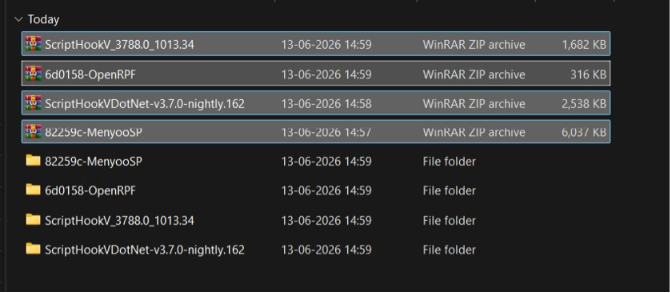
This gives each mod its own clean folder — which makes the next step way easier.
Common mistake: Extracting everything into one folder and then losing track of which file belongs to which mod. Separate folders = no confusion.
Step 3 — Install Everything Into GTA 5 Enhanced
Now open your GTA 5 Enhanced installation folder. If you’re not sure where it is — right-click the game in Rockstar Launcher and go to Properties or Open File Location.
Here’s exactly what goes where: C:\Program Files (x86)\Steam\steamapps\common\Grand Theft Auto V Enhanced
OpenRPF
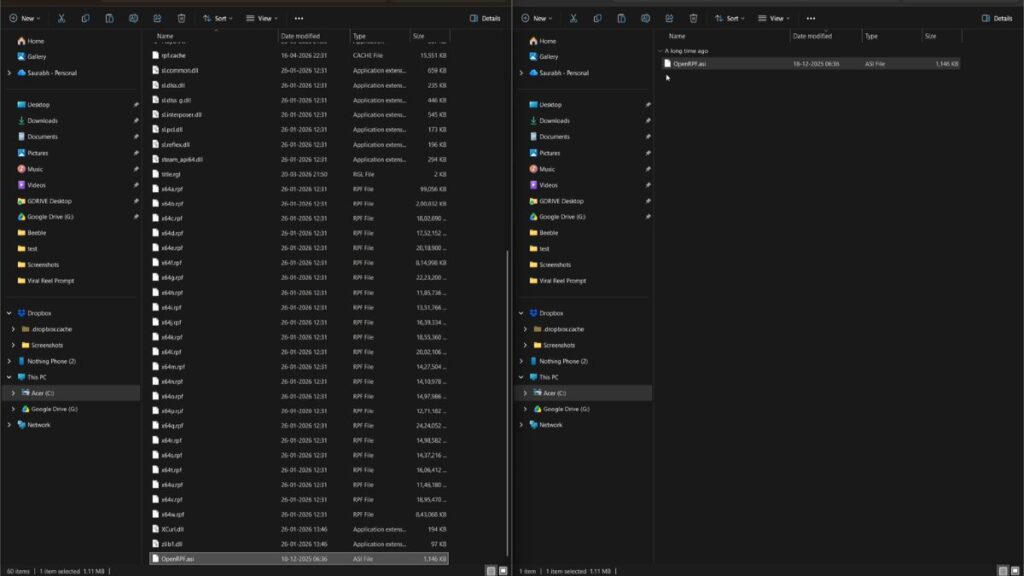
Copy the OpenRPF.exe or .asi file and paste it directly into your GTA 5 Enhanced root folder.
Default location: C:\Program Files (x86)\Steam\steamapps\common\Grand Theft Auto V Enhanced
Menyoo
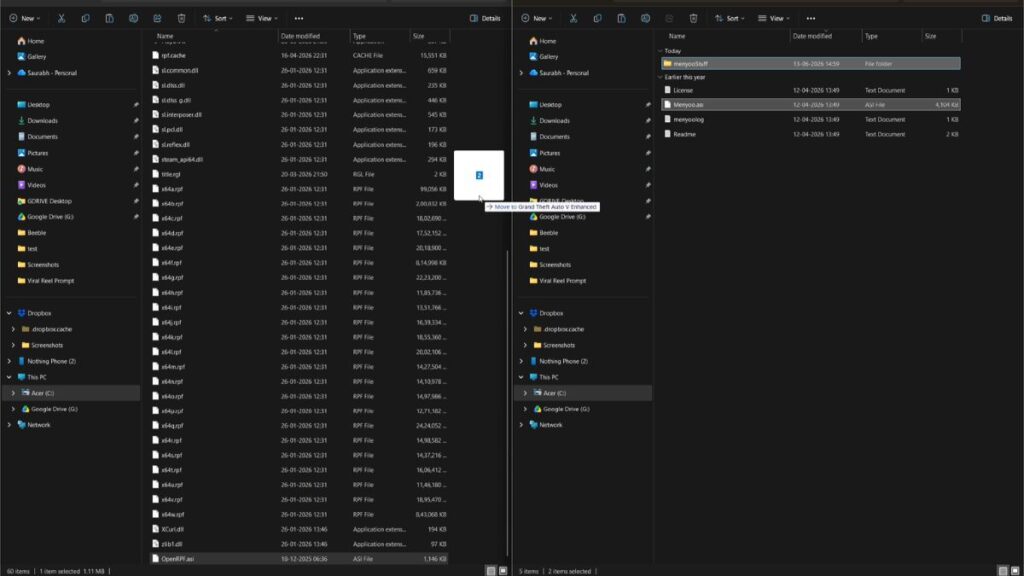
From the Menyoo folder, copy these two things:
- Menyoo Stuff (the folder)
- Menyoo.asi (the file)
Paste both into your GTA 5 Enhanced root folder.
Default location: C:\Program Files (x86)\Steam\steamapps\common\Grand Theft Auto V Enhanced
ScriptHookV
Open the ScriptHookV folder, then go into the bin folder. From there, select these 3 files:
- dinput8.dll
- ScriptHookV.dll
- NativeTrainer.asi (optional but recommended)
Paste all 3 into your GTA 5 Enhanced root folder.
Default location: C:\Program Files (x86)\Steam\steamapps\common\Grand Theft Auto V Enhanced
ScriptHookV .NET
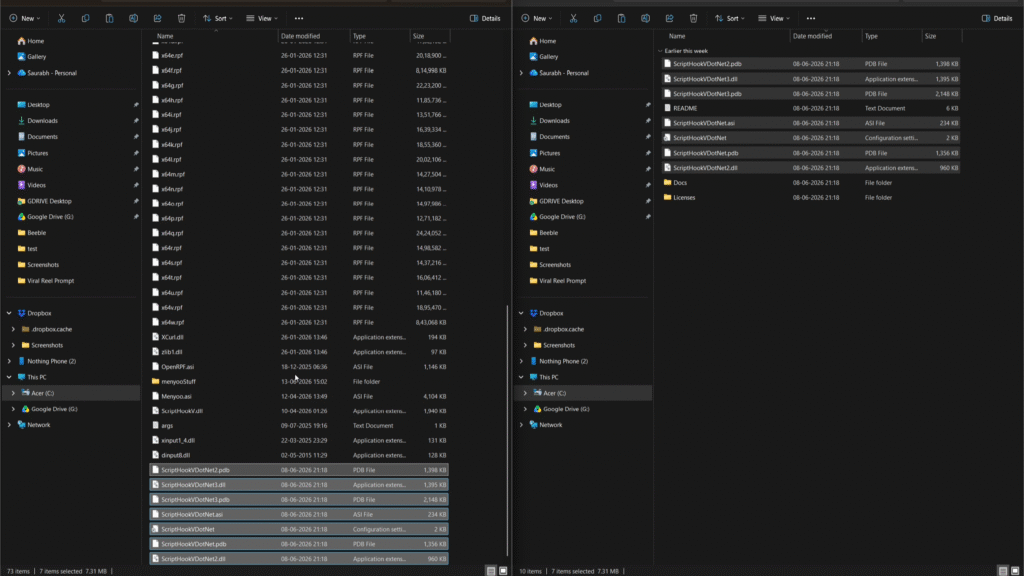
Open the ScriptHookV.NET folder and copy everything inside — all files. Paste them into your GTA 5 Enhanced root folder.
My recommendation: After pasting everything, double check your GTA 5 Enhanced folder. You should see Menyoo.asi, ScriptHookV.dll, dinput8.dll, OpenRPF, and the Menyoo Stuff folder all sitting there.
Step 4 — One Important Setting in Rockstar Launcher
This is the step most people forget — and then wonder why mods aren’t working.
Open Rockstar Games Launcher and log in if needed. Then go to GTA 5 Enhanced settings and find the BattlEye option. Turn it OFF.
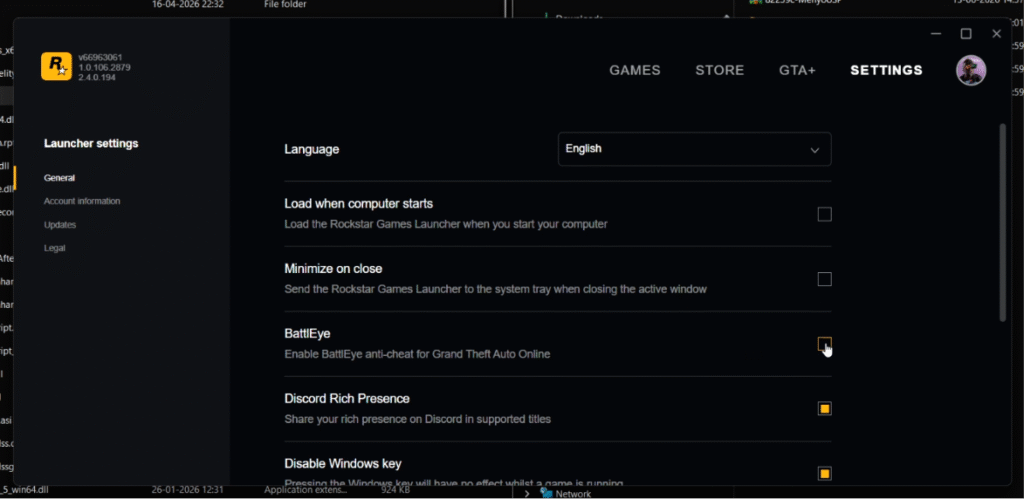
BattlEye is an anti-cheat system. It will block your mods from loading if it’s on. Simple as that.
Here’s the truth: You don’t need to turn off Discord overlay or anything else — just BattlEye. That’s the only one that matters for Menyoo to work.
Step 5 — Launch the Game and Test
Now just launch GTA 5 Enhanced normally through Rockstar Launcher.
Once you’re in the game — press F8.
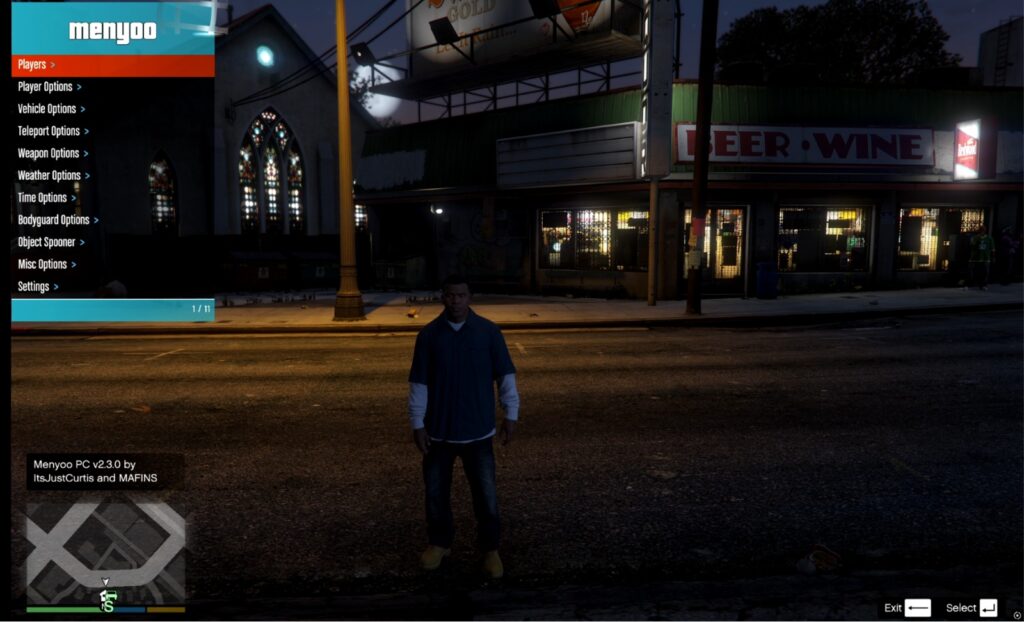
That’s it. Menyoo should open up right there on your screen. If you see the menu — congrats, you did everything right.
If you don’t want to think too much: Just press F8 as soon as you load into story mode. If the menu appears, you’re good. If nothing happens, jump to the troubleshooting section below.
Menyoo Not Working? Try This
Still confused? Here are the most common reasons Menyoo doesn’t open:
- BattlEye is still ON — go back to Rockstar Launcher and turn it off.
- You missed a file — check that Menyoo.asi, ScriptHookV.dll, and dinput8.dll are all in the root GTA folder.
- Wrong ScriptHookV version — make sure your ScriptHookV version matches your game version. If you updated GTA recently, you may need to re-download ScriptHookV.
- You’re in Online mode — Menyoo only works in Story Mode. Never use mods in GTA Online.
Common mistake: Trying to use mods in GTA Online. Don’t. You will get banned. Story Mode only.
Final Thoughts
Installing Menyoo in GTA 5 Enhanced sounds complicated — but once you do it once, it takes less than 5 minutes next time.
If I had to tell you one thing: get all 4 files first, turn off BattlEye, and paste everything in the right folder. That’s literally the whole thing.
The Bodyguard feature is a solid addition — feels polished, works reliably, and genuinely changes how you play story mode.
Good luck — and don’t shoot Doggo.
GTA 6 Update: Trailer 3 Timeline and Release Date Confirmed : Read More
Frequently Asked Questions
1. How do I open Menyoo in GTA 5 Enhanced?
Press F8 once you’re in Story Mode. That’s the default key. If nothing happens, double-check that BattlEye is turned off in Rockstar Launcher and that all 4 files are installed correctly in your GTA 5 Enhanced root folder.
2. Does Menyoo work in GTA Online?
No — and don’t try it. Menyoo is a single-player mod only. Using any mod in GTA Online will get your account banned. Story Mode is the only safe place to run it.
3. Which files do I need to install Menyoo in GTA 5 Enhanced?
You need exactly 4 things: Menyoo itself, ScriptHookV, ScriptHookV .NET (Community Script Hook), and OpenRPF. Skip any one of these and Menyoo won’t load. All download links are available on gta5-mods.com.
4. Why is Menyoo not opening even after installation?
Most common reasons: BattlEye is still ON, your ScriptHookV version doesn’t match your current game version, or you placed files in the wrong folder. Check that Menyoo.asi, ScriptHookV.dll, and dinput8.dll are all sitting in the GTA 5 Enhanced root folder — same place as GTA5.exe.
5. Is Menyoo safe to download?
Yes — as long as you download from gta5-mods.com. That’s the only source you should trust. Don’t download from random sites or YouTube comment links. The mod is community-maintained, open-source, and widely used.
6. How to install Menyoo mod in GTA 5 Enhanced?
To install Menyoo Mod in GTA 5 Enhanced, first download the latest version of Menyoo and ensure that Script Hook V is already installed. Extract the Menyoo files into your GTA 5 Enhanced main game directory, then launch the game. Once in-game, press F8 (default key) to open the Menyoo trainer menu and verify that the mod has been installed successfully.