
Kling 3.0 Examples and Use Cases: What It Can Actually Do
The king of AI video is back.

Kling AI 3.0 is rolling out right now, and it’s not a small update. This is a serious upgrade that finally makes AI video feel usable for real storytelling.
In this guide, I’m breaking down Kling 3.0 examples and use cases based on hands-on testing. You’ll see exactly what works, where it still struggles, and how creators are actually using it in real workflows.
No hype. No filler. Just real results.
Let’s jump in.
In This Post
What Is Kling 3.0?
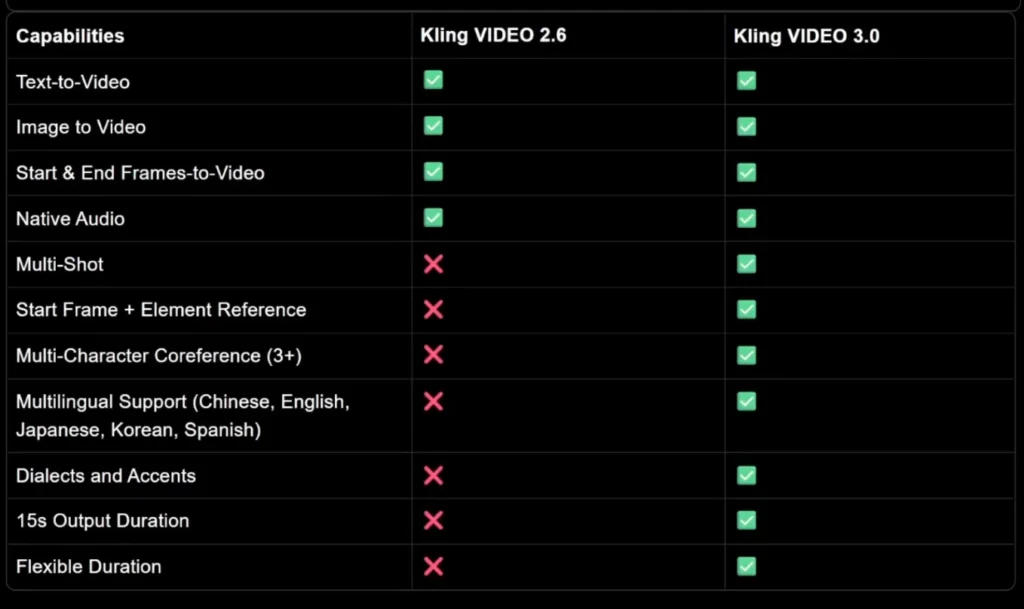
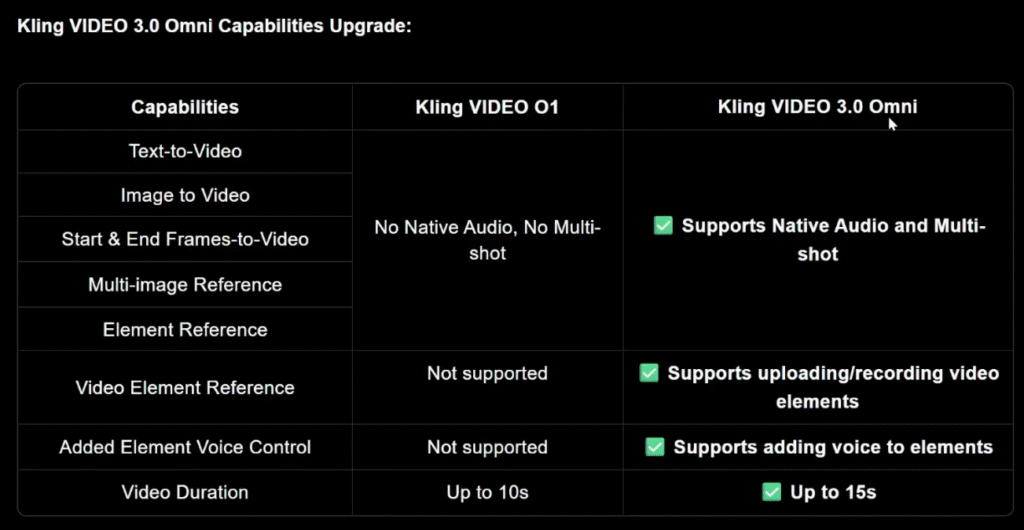
Kling 3.0 is the latest version of Kling’s AI video generation model. It supports text to video, image to video, native audio, lip sync, and up to 15 seconds of output.
The standout feature is multi-shot video generation, which lets you define what happens in each shot instead of generating one random clip.
That one feature changes everything.
Kling 3.0 Examples and Use Cases
Let’s start with real examples.
Image to Video Example
Upload an image as the first frame and write a simple prompt like:

A warrior sprints toward a monster and engages in an epic fight.
With multi-shot on.
The same scene is split into multiple cinematic shots with hard cuts. The pacing improves. The scene feels intentional.
character consistency stays intact across shots, which is something most AI video models still struggle with.
Multi-Shot Storytelling Example
You can go further by manually defining each shot.
Upload an image as the first frame and write a simple prompt like:
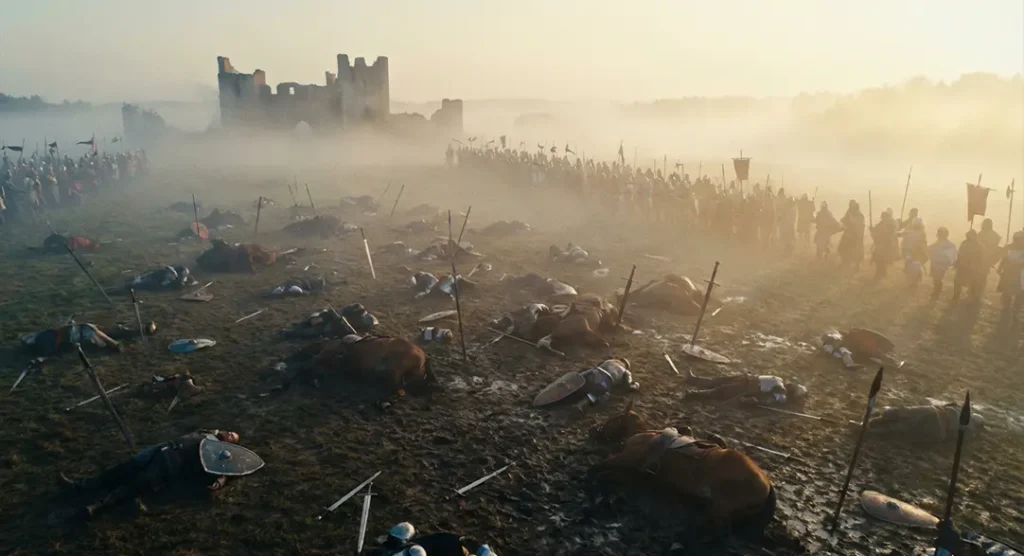
Example setup:
Create a cinematic game teaser with 5 shots.
Shot 1: Wide shot of a massive fantasy city at night, glowing torches, rain falling, cinematic scale.
Shot 2: Tracking shot behind a hooded character walking through a crowded street.
Shot 3: Close-up of a sword being drawn, sparks and reflections, dramatic lighting.
Shot 4: Fast cut action shot – character dodges an attack in slow motion.
Shot 5: Final wide shot of the city skyline with thunder and lightning.Epic fantasy, cinematic camera, realistic motion, dark tone.
The result follows the prompt almost perfectly. Camera movement, pacing, and cuts all make sense.
This is where Kling 3.0 clearly separates itself.
Kling 3.0 Use Cases for Content Creators
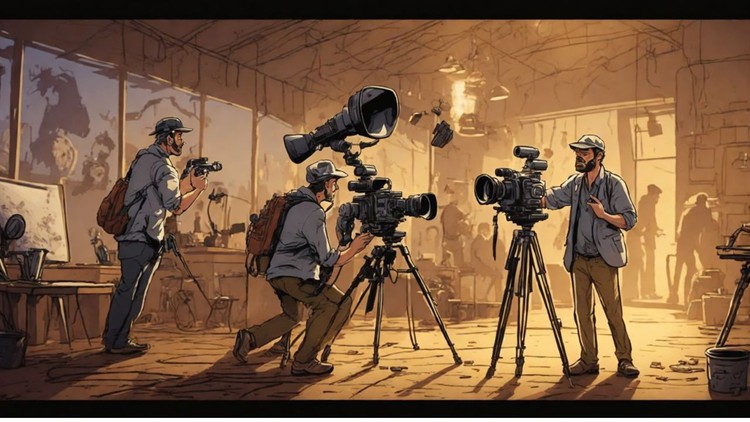
This is where Kling 3.0 actually becomes useful.
YouTube Creators
Creators can generate:
- Cinematic B-roll
- Short narrative sequences
- High-action intros
- Visual explainers
Multi-shot control makes it possible to create scenes instead of random clips.
Short-Form Content (TikTok, Reels, Shorts)
Use case
Brands running Meta ads, product reels, or hero visuals.
Why Kling 3.0 fits
- Short duration optimized for reels
- Clean transitions
- Controlled product focus
Example prompt
Create a premium product reel in 3 shots.
Shot 1: Close-up of a sleek wireless charger on a dark desk, soft blue accent lighting, slow camera pan.
Shot 2: Phone placed on charger, subtle glow appears, minimalistic background, smooth motion.
Shot 3: Final hero shot with clean composition, product centered, cinematic lighting, modern tech aesthetic.
Professional commercial style, realistic textures, smooth motion, no text.
Game Cinematic / Trailer Concept
Use case
Game studios or YouTube creators creating teaser visuals or concept trailers.
Kling 3.0 advantage
- Action + camera movement
- Fantasy / realism blend
- Trailer-style pacing
Example prompt
Create a cinematic game teaser with 5 shots.
Shot 1: Wide shot of a massive fantasy city at night, glowing torches, rain falling, cinematic scale.
Shot 2: Tracking shot behind a hooded character walking through a crowded street.
Shot 3: Close-up of a sword being drawn, sparks and reflections, dramatic lighting.
Shot 4: Fast cut action shot – character dodges an attack in slow motion.
Shot 5: Final wide shot of the city skyline with thunder and lightning.
Epic fantasy, cinematic camera, realistic motion, dark tone.
AI Influencer / Character Video
Use case
Virtual influencers, AI characters, or brand mascots.
Why Kling 3.0 works
- Character consistency
- Facial expressions + motion
- Camera control
Example prompt
Create a realistic AI character video.
Shot 1: Medium shot of a young female digital influencer standing on a city rooftop at sunset.
Shot 2: Close-up as she smiles and looks into the camera, soft cinematic lighting.
Shot 3: Side profile shot as wind moves her hair, shallow depth of field.
Photorealistic human character, natural motion, cinematic realism.
Educational / Explainer Visual
Use case
Ed-tech, Instagram explainers, YouTube shorts.
Strength here
- Visual clarity
- Calm motion
- Easy storytelling
Example prompt
Create a clean educational explainer video in 3 shots.
Shot 1: Minimal desk setup with laptop and notebook, soft daylight, calm camera movement.
Shot 2: Abstract visualization of data lines and charts floating subtly.
Shot 3: Wide shot of a modern workspace with natural light, professional tone.
Clean, modern, minimal, smooth motion.
Fashion / Lifestyle Reel
Use case
Clothing brands, Instagram drops, lookbooks.
Why Kling 3.0 shines
- Fabric realism
- Motion + pose control
- Editorial feel
Example prompt
Create a fashion editorial reel.
Shot 1: Wide shot of a model walking slowly in an urban street, cinematic framing.
Shot 2: Medium shot focusing on outfit details, fabric movement in slow motion.
Shot 3: Close-up portrait with soft natural light, shallow depth of field.
High-fashion editorial style, cinematic realism.
Pre-Visualization for Ads or Films (Storyboard Replacement)
Use case
Directors, agencies, production houses.
Why this matters
- Saves time before shooting
- Replaces rough storyboards
- Visual clarity for clients
Example prompt
Create a pre-visualization cinematic sequence for a commercial.
Shot 1: Establishing shot of a modern city at sunrise.
Shot 2: Interior office shot, professional working on laptop, natural light.
Shot 3: Close-up of hands typing, shallow depth of field.
Shot 4: Final wide shot with confident tone and clean composition.
Neutral color grading, realistic motion, cinematic framing.
Kling 3.0 Advanced Examples and Workflows
Now let’s talk about advanced workflows.
Custom Multi-Shot Workflows
Instead of letting Kling decide everything, you can:
- Define each shot
- Control duration per shot
- Specify camera movement
- Stitch everything into one coherent video
This works especially well for:
- Short films
- Narrative ads
- Action sequences
- Dialogue-heavy scenes
Omni 3 Video Editing Workflow
Kling 3.0 also includes Video 3 Omni, its omni-modal editing model.
With Omni 3, you can:
- Upload images and videos
- Edit scenes using natural language
- Change outfits, colors, and backgrounds
- Add or remove characters
Example prompt:
Make the woman wear a kimono and change the car to red.
It just works.
Consistency is strong, even with complex clothing. Faces can lose detail at a distance, but overall, this is one of the most powerful AI video editing workflows available right now.
Kling 3.0 Strengths and Weaknesses Explained
Let’s be honest.
Strengths
- Excellent multi-shot storytelling
- Strong character consistency
- Good camera movement understanding
- Native audio and lip sync
- Multilingual support
- Up to 15 seconds of video
- 1080p output
This is one of the few AI video models that feels usable for real projects.
Weaknesses
- Fast motion still causes blur
- Fingers and faces can break in action scenes
- Physics-heavy scenes aren’t perfect
- Distant shots lose fine detail
It’s a big improvement, but it’s not flawless.
World Understanding and Style Tests
Kling 3.0 shows solid world understanding.
- It understands game concepts like Squid Game without copying characters
- It handles 3D animation styles like Disney-Pixar convincingly
- Educational prompts work better than expected
- Motion graphics are hit or miss
Compared to older versions, it’s noticeably smarter.
Conclusion
Kling 3.0 is a massive upgrade.
The multi-shot feature alone changes how AI video is made. Instead of generating random 5-second clips, you can now create structured scenes with real pacing and intent.
It still struggles with extreme motion and fine details, but overall, this is one of the strongest AI video generators available right now.
If you care about cinematic control, storytelling, and consistency, Kling 3.0 is absolutely worth testing.
FAQs
What are the best Kling 3.0 examples and use cases?
Multi-shot storytelling, cinematic B-roll, anime dialogue, and short narrative videos.
What are the main Kling 3.0 use cases for content creators?
YouTube videos, Shorts, ads, cinematic intros, and visual storytelling.
Does Kling 3.0 support advanced workflows?
Yes. Custom multi-shot control and Omni 3 editing allow complex workflows.
What are Kling 3.0’s strengths and weaknesses?
Strong consistency and storytelling, weaker fine detail in fast motion.
Is Kling 3.0 worth using right now?
Yes, especially if you want cinematic control and structured scenes.