
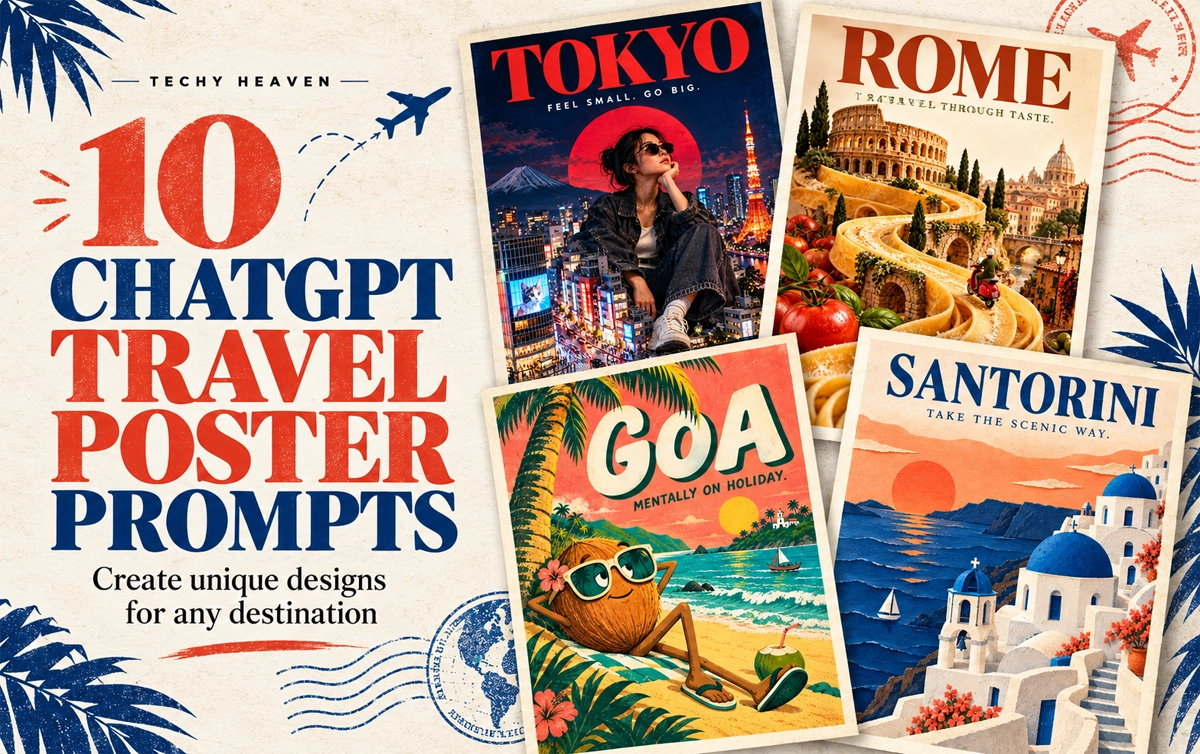

Travel posters do not have to follow the same predictable layout. With the right ChatGPT travel poster prompts, one destination can be transformed into a surreal miniature city, a brutalist collage, a cinematic night scene or even a handcrafted paper world.
Below are ten creative poster directions you can customise for any city, country or landmark.
In This Post
How to Use These Travel Poster Prompts
Replace [PLACE NAME] with your chosen destination and paste the prompt into ChatGPT.
For Instagram posts and digital posters, ask for a vertical 4:5 composition. You can also change the tagline, colours, typography and landmarks.
1. Giant Tourist, Tiny City
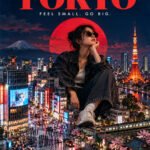
LOCATION: [PLACE NAME]
Create a surreal travel poster featuring a giant stylish traveller sitting among this destination’s miniature landmarks and streets. Use realistic photographic collage, playful scale, bold editorial typography, and colours inspired by the place. Add the location name and “FEEL SMALL. GO BIG.” Vertical composition, premium finish, no extra text or mockup.
2. Destination Inside Typography
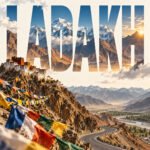
LOCATION: [PLACE NAME]
Create a typography-led travel poster with the location name in massive lettering. Integrate recognisable local landscapes inside the letters, with a few elements breaking beyond their edges. Use a clean background, a refined colour palette, and generous negative space. Make the word clearly readable. Vertical composition, no extra text or mockup.
3. Boarding Pass Poster
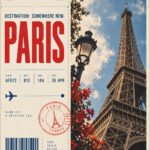
LOCATION: [PLACE NAME]
Design a travel poster as an oversized boarding pass with the location name as the main destination. Include subtle perforations, travel stamps, route graphics, and one striking photograph of a local landmark. Use precise ticket-style typography, warm paper texture, and one bold accent colour. Add “DESTINATION: SOMEWHERE NEW.” Vertical layout, minimal supporting details, no mockup.
4. Travel Through Taste
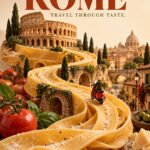
LOCATION: [PLACE NAME]
Create a surreal travel poster where a signature local dish transforms into the destination’s landscape, with miniature landmarks integrated into the food. Use appetising realistic textures, an unexpected composition, and a clean studio background. Add elegant bold typography with the location name and “TRAVEL THROUGH TASTE.” Vertical layout, no extra text or mockup.
5. Loud City, Loud Poster
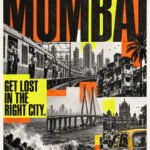
LOCATION: [PLACE NAME]
Create a bold brutalist travel poster using authentic local street photography, oversized stretched typography, gritty textures, and sharp overlapping colour blocks. Combine monochrome imagery with one fluorescent accent. Make the location name dominant and add “GET LOST IN THE RIGHT CITY.” Controlled visual chaos, strong readability, vertical layout, no mockup.
6. The Quietest View
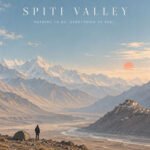
LOCATION: [PLACE NAME]
Create a minimalist travel poster showing one tiny traveller within an expansive, recognisable landscape of this destination. Use soft pastel colours, atmospheric light, subtle grain, and generous negative space. Pair the location name with small elegant typography reading “NOTHING TO DO. EVERYTHING TO FEEL.” Calm, premium vertical composition, no extra elements or mockup.
7. Odd Travel Character
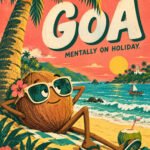
LOCATION: [PLACE NAME]
Create a quirky illustrated travel poster starring an eccentric character inspired by this destination’s landscape, food, or landmark. Give it exaggerated proportions, expressive eyes, and unexpected travel accessories. Use playful typography, bold flat colours, and subtle print texture. Include the location name and “MENTALLY ON HOLIDAY.” Vertical layout, distinctive character design, no mockup.
8. Destination in a Glass Box
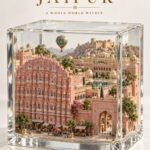
LOCATION: [PLACE NAME]
Create a travel poster featuring an intricate miniature version of this destination inside a transparent glass cube. Include recognisable landmarks, local terrain, tiny streets, and atmospheric details. Use realistic materials, soft studio lighting, and a clean background. Add the location name with refined museum-label typography and “A WHOLE WORLD WITHIN.” Vertical layout, no mockup.
9. After Dark
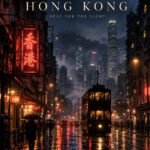
LOCATION: [PLACE NAME]
Create a cinematic travel poster showing this destination after dark, with authentic local architecture, atmospheric shadows, and luminous reflections. Use deep indigo tones with restrained warm or neon accents. Compose it like an independent film poster, with elegant typography displaying the location name and “STAY FOR THE NIGHT.” Vertical layout, no extra text or mockup.
10. Paper World
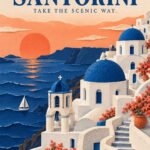
LOCATION: [PLACE NAME]
Create a handcrafted paper-cut travel poster depicting this destination’s iconic landmarks and landscape through layered coloured paper. Use tactile edges, subtle paper grain, realistic soft shadows, and a limited palette of three complementary colours. Integrate the location name into the composition and add “TAKE THE SCENIC WAY.” Premium vertical layout, no extra text or mockup.
The Six-Part Prompt Formula
When creating your own ChatGPT image prompt, remember this structure:
Location + Visual Concept + Design Style + Colour Palette + Typography + Format
A well-structured prompt gives ChatGPT a clear visual direction while leaving enough room for creative interpretation.
For a simpler reusable template, see our premium AI travel poster prompt.
Tips for Better Results
- Mention specific landmarks instead of requesting an entire city.
- Limit the design to two or three main colours.
- Keep poster text short and clearly specify the exact wording.
- Ask for clean margins and a strong typography hierarchy.
- Generate a few versions before selecting the final composition.
- If the text is incorrect, request a targeted typography correction.
Frequently Asked Questions
Can I use these prompts for any destination?
Yes. Replace the location placeholder and add details associated with your chosen city, country, island or landmark.
What image size should I use?
A vertical 4:5 format works well for Instagram carousel posts. For printing, generate the artwork at the highest available resolution.
Can ChatGPT add text to travel posters?
Yes, but you should provide the exact text inside quotation marks. Always check the final spelling before publishing or printing.
Which travel poster style should I try first?
Start with the destination-inside-typography or minimalist landscape concept. Both work with a wide range of locations and are easy to customise.
These ten ChatGPT travel poster prompts are starting points. Change the destination, visual metaphor, colours and art direction to create a travel-poster collection that feels completely your own.

0 Comments